Vigil — User Guide
For the Snowflake Native App edition, installed from the Snowflake Marketplace. This is the public documentation the listing links to: how to install Vigil, point it at your layers, read what it finds, run it day to day, and try it on sample data first. Version 1.0.
1. What Vigil does
Vigil checks that the layers of your medallion platform agree with each other — Bronze → Silver, Silver → Gold, or whatever you call them — for any number of source systems, and turns the answer into something an engineer can act on and an auditor can rely on.
You describe a pipeline (one source system between two adjacent layers) and its table pairs as rows in six configuration tables. Vigil then:
- Generates a pair of normalised views per table pair — keys, a hash of the business columns, the aggregates you asked for — handling change-image feeds, deleted rows, type differences and legacy encodings from configuration rather than code.
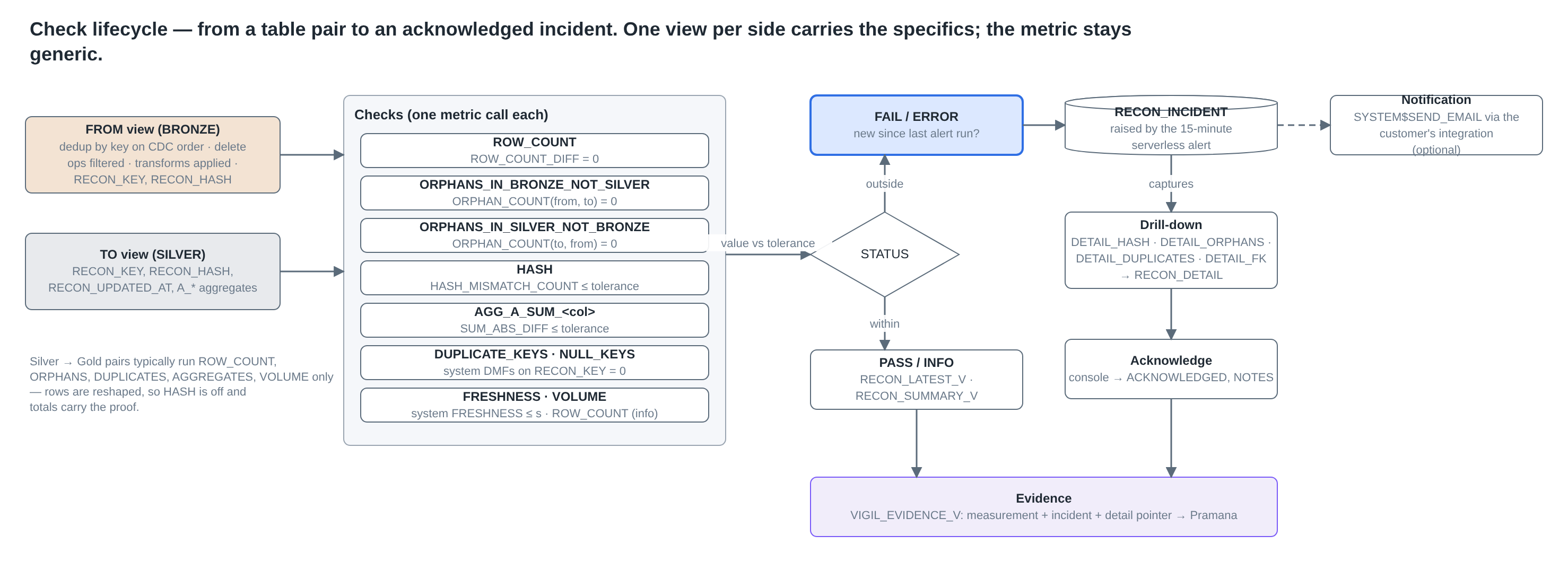
- Checks each pair on a schedule you set: row counts, orphan keys on either side, duplicate and null keys, a row-level hash comparison, aggregate totals with tolerances, referential integrity within a layer, freshness and volume, and schema drift between the two sides.
- Raises incidents for every new failure, with up to 500 of the rows that caused it. A check that stays red is folded into its open incident (last seen, occurrences) rather than raised again on every run; you acknowledge it with a note from the console or in SQL.
- Keeps the evidence. Every measurement is kept, and
VIGIL_EVIDENCE_Vis a stable view for auditors and governance tooling. - Signals. Failures, runs and incidents are also OpenTelemetry-shaped events in your account's event table, so they sit next to your pipeline and application telemetry in Observe by Snowflake or any collector that reads the event table.
Everything runs inside your account. Vigil reads the tables you grant it, writes only to its own schemas, needs no warehouse of its own, no external access and no vendor endpoint. Nothing leaves Snowflake.
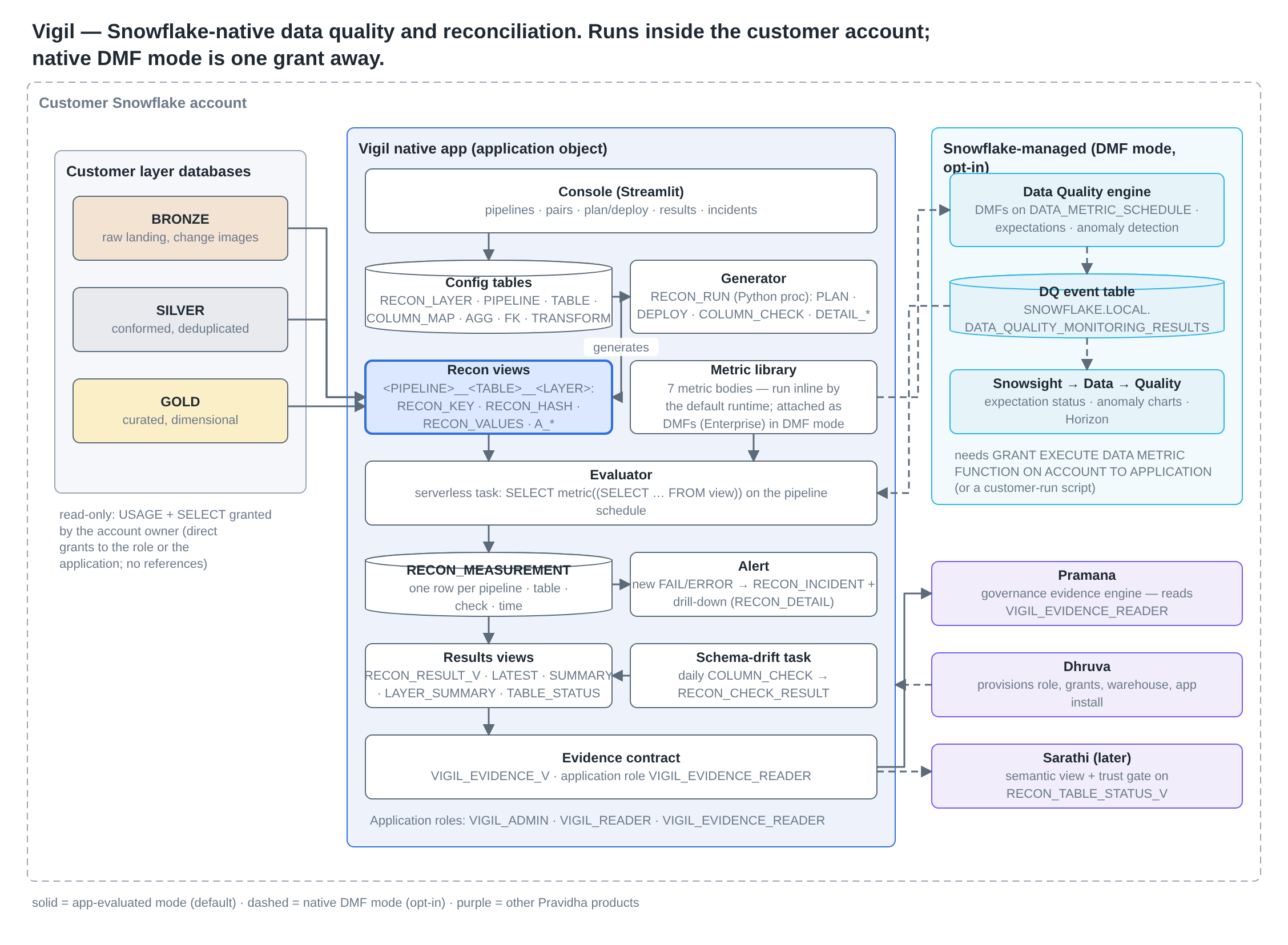
Requirements. Any Snowflake edition (Standard, Enterprise, trial) and a role that can install applications from the Marketplace. The application asks for two account privileges, EXECUTE TASK and EXECUTE MANAGED TASK, because its schedules are serverless tasks; every task is created suspended, so nothing runs — or bills — until you call RECON_START(). The Snowflake CLI is handy for uploading CSVs but not required; everything in this guide can be done from a Snowsight worksheet.
2. Install (about ten minutes)
The examples use VIGIL as the application's name; pick what you like when you install.
1. Install the application from the listing (Snowsight → Catalog → Marketplace → Vigil → Get; Data Products → Marketplace on the older navigation) and accept the two privileges it asks for.
2. Give Vigil read access to your layers. As the owner of each layer database, or ACCOUNTADMIN:
GRANT USAGE  ON DATABASE <LAYER_DB>                  TO APPLICATION VIGIL;
GRANT USAGE  ON ALL SCHEMAS IN DATABASE <LAYER_DB>   TO APPLICATION VIGIL;
GRANT SELECT ON ALL TABLES IN DATABASE <LAYER_DB>    TO APPLICATION VIGIL;
-- repeat per layer database; views and dynamic tables work too (ON ALL VIEWS …)
Snowflake does not allow a future grant to an application, so re-run the ON ALL TABLES grant when a layer gains a table or a table is re-created (CREATE OR REPLACE TABLE drops its grants unless it says COPY GRANTS). A pipeline whose table Vigil cannot read fails its DEPLOY with "No columns found" — that is the cue. Vigil never writes to your layers.
3. Hand out the application roles:
GRANT APPLICATION ROLE VIGIL.VIGIL_ADMIN           TO ROLE <data engineering role>;   -- configure, deploy, evaluate, acknowledge, start / stop
GRANT APPLICATION ROLE VIGIL.VIGIL_READER          TO ROLE <analyst role>;            -- results, incidents, the read-only console
GRANT APPLICATION ROLE VIGIL.VIGIL_EVIDENCE_READER TO ROLE <governance service role>; -- the evidence view only
4. Describe a pipeline. Either insert rows into the configuration tables (§3 walks through one), or fill in the six CSV templates and load them in one go:
-- with the Snowflake CLI (snow sql) or SnowSQL:
PUT file://config/*.csv @VIGIL.RECON.RECON_CONFIG_STAGE AUTO_COMPRESS = FALSE OVERWRITE = TRUE;
CALL VIGIL.CORE.RECON_LOAD_CONFIG();     -- replaces the six tables; returns the row count of each
5. Look, deploy, evaluate, start:
CALL VIGIL.CORE.RECON_RUN('PLAN', '<PIPELINE_NAME>', OBJECT_CONSTRUCT('recon_schema', 'RECON', 'code_schema', 'CORE'));  -- writes nothing
CALL VIGIL.CORE.RECON_DEPLOY_ALL();        -- generated views + one evaluator task per enabled pipeline
CALL VIGIL.CORE.RECON_EVALUATE_ALL();      -- every check, now
SELECT * FROM VIGIL.CORE.RECON_LAYER_SUMMARY_V;
CALL VIGIL.CORE.RECON_START();             -- resume the tasks; RECON_STOP() suspends them all again
Then open the console: Snowsight → Catalog → Apps → VIGIL (Data Products → Apps on the older navigation). It runs on the warehouse you pick there. Two tabs: VIGIL_VIEWER (pipelines, results, incidents; read-only; open to both roles) and VIGIL_CONSOLE (administration — plan, deploy, evaluate, acknowledge, start / stop / status, row-level drill-down), which only holders of VIGIL_ADMIN can open.
Nothing to point it at yet? §9 installs a three-layer sample platform beside the application in a few minutes.
3. Your first pipeline (walkthrough)
Suppose a Bronze schema RAW_DB.SALES receives change images from an orders system (every row has OP_TYPE I/U/D and a CHANGE_SEQ), and your Silver schema CONFORMED_DB.SALES holds one row per order. Run these as a holder of VIGIL_ADMIN.
Step 1 — describe the pipeline
INSERT INTO VIGIL.RECON.RECON_PIPELINE_CONFIG
  (PIPELINE_NAME, SOURCE_SYSTEM, FROM_LAYER, TO_LAYER, FROM_DATABASE, FROM_SCHEMA, TO_DATABASE, TO_SCHEMA,
   CDC_OP_COLUMN, CDC_DELETE_OPS, CDC_ORDER_BY, CDC_DELETE_MODE, COLUMN_MATCH_MODE, EVAL_MODE, SCHEDULE, DESCRIPTION)
VALUES
  ('SALES_BRONZE_TO_SILVER', 'SALES', 'BRONZE', 'SILVER', 'RAW_DB', 'SALES', 'CONFORMED_DB', 'SALES',
   'OP_TYPE', '''D''', 'CHANGE_SEQ DESC', 'HARD', 'NAME', 'APP', 'USING CRON 30 * * * * UTC',
   'Orders system, change images, latest image per key, deletes applied');
CDC_DELETE_OPS is pasted into NOT IN (…), so a string operation code is written with quotes ('D', hence ''D'' inside a SQL literal) and numeric ones without (3,4). HARD means your Silver load deletes a key when its latest image is a delete; use SOFT if Silver keeps soft-deleted rows. A snapshot feed (no operation column) leaves CDC_OP_COLUMN NULL and puts the "latest row" ordering in CDC_ORDER_BY (for example _SYNCED_AT DESC NULLS LAST).
Step 2 — add the table pairs
INSERT INTO VIGIL.RECON.RECON_TABLE_CONFIG
  (PIPELINE_NAME, FROM_TABLE, TO_TABLE, FROM_KEY, TO_KEY, TO_UPDATED_COLUMN, FRESHNESS_MAX_MINUTES, CHECKS)
VALUES
  ('SALES_BRONZE_TO_SILVER', 'ORDERHEADER', 'ORDER_HEADER', 'ORDERID',        'ORDER_ID',         'ETL_UPDATED_AT', 1440,
   'ROW_COUNT,ORPHANS,DUPLICATES,NULL_KEYS,HASH,AGGREGATES,FRESHNESS,VOLUME'),
  ('SALES_BRONZE_TO_SILVER', 'ORDERLINE',   'ORDER_LINE',   'ORDERID,LINENO', 'ORDER_ID,LINE_NO', 'ETL_UPDATED_AT', 1440,
   'ROW_COUNT,ORPHANS,DUPLICATES,NULL_KEYS,HASH,AGGREGATES,FRESHNESS,VOLUME');
Composite keys are comma lists with the same number of columns on both sides. CHECKS can be left out (the default is everything except FRESHNESS).
Step 3 — tell it what it cannot guess
With COLUMN_MATCH_MODE = NAME, ORDERID pairs with ORDER_ID and NETAMOUNT with NET_AMOUNT by itself. Columns that are renamed outright, or that change type, need a line in the column map:
INSERT INTO VIGIL.RECON.RECON_COLUMN_MAP (PIPELINE_NAME, FROM_TABLE, FROM_COLUMN, TO_COLUMN, FROM_EXPR) VALUES
  ('SALES_BRONZE_TO_SILVER', 'ORDERHEADER', 'ORDERDATE',  'ORDER_DATE',    '@YYYYMMDD_DATE'),   -- 20260527 → DATE
  ('SALES_BRONZE_TO_SILVER', 'ORDERHEADER', 'STATUSFLAG', 'IS_OPEN',       '@YN_BOOLEAN'),      -- 'Y'/'N' → BOOLEAN
  ('SALES_BRONZE_TO_SILVER', 'ORDERHEADER', 'CUSTNAME',   'CUSTOMER_NAME', NULL);               -- just a rename
Transforms are templates in RECON_TRANSFORM (@YYYYMMDD_DATE, @CYYMMDD_DATE, @HHMMSS_TIME, @YN_BOOLEAN, @EPOCH_SECONDS_TS, @UPPER_TRIM_TEXT, …) or any SQL with {col} in it: 'UPPER(TRIM({col}))'. A known, accepted difference is a map row with INCLUDE_IN_HASH = FALSE.
Totals and relationships are optional but cheap:
INSERT INTO VIGIL.RECON.RECON_AGG_CONFIG (PIPELINE_NAME, FROM_TABLE, FROM_COLUMN, TO_COLUMN, AGG_TYPE, TOLERANCE) VALUES
  ('SALES_BRONZE_TO_SILVER', 'ORDERHEADER', 'ORDERTOTAL', 'ORDER_TOTAL', 'SUM', 0.01),
  ('SALES_BRONZE_TO_SILVER', 'ORDERHEADER', 'ORDERDATE',  'ORDER_DATE',  'MAX', 0);
INSERT INTO VIGIL.RECON.RECON_FK_CONFIG (PIPELINE_NAME, RELATIONSHIP_NAME, CHILD_TABLE, CHILD_COLUMNS, PARENT_TABLE, PARENT_COLUMNS) VALUES
  ('SALES_BRONZE_TO_SILVER', 'LINE_TO_HEADER', 'ORDER_LINE', 'ORDER_ID', 'ORDER_HEADER', 'ORDER_ID');
Step 4 — look before you deploy
CALL VIGIL.CORE.RECON_RUN('PLAN', 'SALES_BRONZE_TO_SILVER', OBJECT_CONSTRUCT('recon_schema', 'RECON', 'code_schema', 'CORE'));
The result is JSON: the exact CREATE VIEW statements (read the FROM view — you should recognise your dedup logic and transforms in it), the checks, the evaluator task, and an errors list. Typical first-time errors: a column named in the configuration that does not exist (RECON_COLUMN_MAP … not found), a key arity mismatch, or no read access to a database (No columns found for …).
Step 5 — deploy and evaluate
CALL VIGIL.CORE.RECON_RUN('DEPLOY',   'SALES_BRONZE_TO_SILVER', OBJECT_CONSTRUCT('recon_schema', 'RECON', 'code_schema', 'CORE'));
CALL VIGIL.CORE.RECON_RUN('EVALUATE', 'SALES_BRONZE_TO_SILVER', OBJECT_CONSTRUCT('recon_schema', 'RECON', 'code_schema', 'CORE'));
SELECT TO_TABLE, CHECK_NAME, METRIC_VALUE, TOLERANCE, STATUS
  FROM VIGIL.CORE.RECON_LATEST_V WHERE PIPELINE_NAME = 'SALES_BRONZE_TO_SILVER' ORDER BY 1, 2;
From here the task RECON_EVAL__SALES_BRONZE_TO_SILVER evaluates on the schedule you gave — once you start it. If something is red, §5 and §6; if everything is green, step 6.
Step 6 — switch on the operations
Nothing scheduled runs until you throw the switch — not the incident sweep, not the housekeeping, not a deployed pipeline's evaluator:
CALL VIGIL.CORE.RECON_START();    -- resumes the four housekeeping tasks and every evaluator; remembers RUNNING = TRUE
CALL VIGIL.CORE.RECON_STATUS();   -- edition, version, every task with state and schedule
CALL VIGIL.CORE.RECON_STOP();     -- suspends them all; nothing runs or bills until the next START
While RUNNING is TRUE, a DEPLOY resumes the evaluator it creates; after RECON_STOP it leaves it suspended. Evaluating on demand (RECON_EVALUATE_ALL, the console's buttons) works either way. The same three controls are on the Overview page of the VIGIL_CONSOLE tab.
4. Configuration reference
Six tables in VIGIL.RECON. The CSV templates (one per table, named after it: recon_pipeline_config.csv, …) have exactly these columns; RECON_LOAD_CONFIG() replaces all six from the files in @VIGIL.RECON.RECON_CONFIG_STAGE.
RECON_PIPELINE_CONFIG
| Column | Required | Meaning |
|---|---|---|
PIPELINE_NAME |
yes | Unique, [A-Z0-9_]; becomes part of object names |
SOURCE_SYSTEM, FROM_LAYER, TO_LAYER |
yes | Layers must exist in RECON_LAYER, FROM below TO |
FROM_DATABASE, FROM_SCHEMA, TO_DATABASE, TO_SCHEMA |
yes | Where the two sides live (a per-table FROM_SCHEMA override exists) |
CDC_OP_COLUMN, CDC_DELETE_OPS |
for CDC feeds | Operation column and the values meaning delete (3,4 or 'D') |
CDC_ORDER_BY |
for feeds with several rows per key | "Latest row" ordering, e.g. CHANGE_SEQ DESC or _SYNCED_AT DESC NULLS LAST |
CDC_DELETE_MODE |
HARD (default: deleted keys dropped) or SOFT (delete images ignored) |
|
FROM_EXCLUDE_REGEX, TO_EXCLUDE_REGEX |
Technical columns to ignore; NULL inherits the layer default | |
TO_EXCLUDE_EXCEPTIONS |
Comma list of TO columns to keep even if the regex matches | |
COLUMN_MATCH_MODE |
NAME (default), POSITION, EXPLICIT |
|
ZERO_AS_NULL |
Treat numeric 0 as NULL in hashes (legacy sources) | |
EVAL_MODE |
APP (default). DMF and BOTH are accepted for compatibility with the standalone edition; inside the application every pipeline is evaluated by its own task, and the deploy log says so |
|
SCHEDULE |
Evaluator task schedule: '30 MINUTE' or 'USING CRON 0 */6 * * * UTC' |
|
ENABLED, DESCRIPTION |
RECON_TABLE_CONFIG
| Column | Meaning |
|---|---|
FROM_TABLE, TO_TABLE |
The pair (FROM_SCHEMA optional override) |
FROM_KEY, TO_KEY |
Comma lists, same arity; a token may be an expression such as TRIM(CODE) |
FROM_FILTER |
Extra predicate on the FROM side, e.g. REGION = 'UK' |
DEDUP_ORDER_BY |
Per-table override of CDC_ORDER_BY |
TO_UPDATED_COLUMN, FRESHNESS_MAX_MINUTES |
For the FRESHNESS check |
CHECKS |
Subset of ROW_COUNT, ORPHANS, DUPLICATES, NULL_KEYS, HASH, AGGREGATES, FRESHNESS, VOLUME |
HASH_TOLERANCE |
Mismatching rows allowed before HASH fails (default 0) |
The other four
| Table | Columns |
|---|---|
RECON_COLUMN_MAP |
PIPELINE_NAME, FROM_TABLE, FROM_COLUMN → TO_COLUMN, optional FROM_EXPR / TO_EXPR (a {col} template or @TRANSFORM), INCLUDE_IN_HASH |
RECON_AGG_CONFIG |
PIPELINE_NAME, FROM_TABLE, FROM_COLUMN → TO_COLUMN (columns or expressions), AGG_TYPE in SUM | MIN | MAX | COUNT_DISTINCT, TOLERANCE |
RECON_FK_CONFIG |
PIPELINE_NAME, RELATIONSHIP_NAME, CHILD_TABLE.CHILD_COLUMNS → PARENT_TABLE.PARENT_COLUMNS, all in the TO layer |
RECON_LAYER |
LAYER_NAME, LAYER_ORDER, DEFAULT_EXCLUDE_REGEX — seeded with BRONZE, SILVER, GOLD; rename or add layers here |
Configuration values are expressions, never statements: a value carrying ;, --, /* or $$ is refused at PLAN.
5. Recipes
CDC feed with numeric operations. CDC_OP_COLUMN = 'CHANGE_OP', CDC_DELETE_OPS = '3,4', CDC_ORDER_BY = 'CHANGE_SEQUENCE DESC, CHANGE_TIME DESC NULLS LAST', CDC_DELETE_MODE = 'HARD' (or SOFT if Silver keeps deleted rows flagged).
Snapshot feed. CDC_OP_COLUMN NULL, CDC_ORDER_BY = '_SYNCED_AT DESC NULLS LAST'. The default Bronze regex already ignores common loader columns (_FIVETRAN_* and the like); check RECON_LAYER.DEFAULT_EXCLUDE_REGEX for yours.
Legacy system with cryptic names. COLUMN_MATCH_MODE = 'POSITION', ZERO_AS_NULL = TRUE, transforms in the column map for every NUMBER → DATE / TIME column (@CYYMMDD_DATE, @HHMMSS_TIME, @YEAR_OFFSET_1900). The daily schema check is what tells you the position-based pairing has shifted.
Silver → Gold dimensional model. COLUMN_MATCH_MODE = 'EXPLICIT'; for the fact table, keys plus AGGREGATES and no HASH (CHECKS = 'ROW_COUNT,ORPHANS,DUPLICATES,NULL_KEYS,AGGREGATES,VOLUME'); for dimensions, keys plus the attributes you map plus HASH; FKs from fact keys to dimension keys. The sample platform's SALES_SILVER_TO_GOLD is exactly this.
A subset of rows. FROM_FILTER = 'COUNTRY = ''GB''' on the table pair (a TO-side filter is not supported; reconcile against a view instead).
A table that is too big to hash every run. Drop HASH from CHECKS, keep counts, orphans and totals, and lengthen SCHEDULE. Run DETAIL_HASH on demand when counts disagree (§7).
A known difference you accept. A column-map row with INCLUDE_IN_HASH = FALSE, or a HASH_TOLERANCE above 0 if it is a bounded number of rows.
One source system, several layer hops. One pipeline per hop (ORDERS_BRONZE_TO_SILVER, ORDERS_SILVER_TO_GOLD); a defect in the middle shows at both transitions, which is the point.
6. Reading results
SELECT * FROM VIGIL.CORE.RECON_LAYER_SUMMARY_V;                                   -- health per layer transition
SELECT * FROM VIGIL.CORE.RECON_TABLE_STATUS_V WHERE OVERALL_STATUS = 'FAIL';      -- which pairs, which checks
SELECT * FROM VIGIL.CORE.RECON_LATEST_V WHERE STATUS IN ('FAIL', 'ERROR') ORDER BY MEASUREMENT_TIME DESC;
SELECT * FROM VIGIL.CORE.RECON_RESULT_V WHERE PIPELINE_NAME = '…' AND CHECK_NAME = 'ROW_COUNT' ORDER BY MEASUREMENT_TIME;  -- history
Statuses: PASS, FAIL (outside tolerance), ERROR (the check could not run — DETAIL carries the statement and the error), INFO (VOLUME, and FRESHNESS without a limit).
METRIC_VALUE is the raw metric: for ROW_COUNT it is signed (FROM − TO), so -5 means the upper layer has five rows more; for orphans, duplicates and hash it is a row count; for aggregates an absolute difference; for FRESHNESS seconds since the newest TO_UPDATED_COLUMN.
The console shows the same views with filters, a trend and the pipeline configuration. VIGIL_READER is enough to look; VIGIL_ADMIN opens the VIGIL_CONSOLE tab, which also plans, deploys and evaluates from the browser.
For other tools, two more views: VIGIL_EVIDENCE_V is the evidence contract (one row per check: measurement, tolerance, incident, acknowledgement, captured-row count, both sides fully qualified), and VIGIL_TELEMETRY_V is the same facts as OpenTelemetry-shaped rows for a collector that would rather pull rows than read the event table (§8).
7. Incidents and drill-down
Once Vigil is started, a new FAIL / ERROR becomes a row in RECON_INCIDENT within 15 minutes (the RECON_VIOLATION_TASK sweep), and for HASH, orphan, duplicate and FK failures the offending keys are captured in RECON_DETAIL (up to 500 per incident). An incident is a condition, not a measurement: while it is unacknowledged, every further failure of the same check is folded into it — LAST_SEEN_AT and METRIC_VALUE move, OCCURRENCES counts — so a check that stays red is one incident, and the next failure after you acknowledge it is a new one.
SELECT INCIDENT_ID, PIPELINE_NAME, TO_TABLE, CHECK_NAME, METRIC_VALUE, OCCURRENCES, DETAIL_RUN_ID
  FROM VIGIL.RECON.RECON_INCIDENT WHERE NOT ACKNOWLEDGED ORDER BY RAISED_AT DESC;

SELECT RECON_KEY, FROM_VALUES, TO_VALUES
  FROM VIGIL.RECON.RECON_DETAIL WHERE DETAIL_RUN_ID = '<from the incident>';
FROM_VALUES / TO_VALUES are the normalised business columns in the order the hash used (the pairing order is in RECON_DEPLOY_LOG → DETAIL.columns for the view). RECON_DETAIL carries business values, so only VIGIL_ADMIN can read it. Acknowledge from the console, or:
UPDATE VIGIL.RECON.RECON_INCIDENT
   SET ACKNOWLEDGED = TRUE, ACKNOWLEDGED_BY = CURRENT_USER(), ACKNOWLEDGED_AT = CURRENT_TIMESTAMP(), NOTES = 'Backfill of 27 May re-run'
 WHERE INCIDENT_ID = <id>;
Need the rows now, without waiting for the sweep? CALL VIGIL.CORE.RECON_RAISE_INCIDENTS() sweeps the last 30 days at once, or capture directly:
CALL VIGIL.CORE.RECON_RUN('DETAIL_HASH', '<pipeline>', OBJECT_CONSTRUCT('recon_schema', 'RECON', 'code_schema', 'CORE', 'to_table', 'ORDER_HEADER', 'limit', 200));
-- also DETAIL_ORPHANS, DETAIL_DUPLICATES, DETAIL_FK (with 'relationship')
8. Telemetry: Observe by Snowflake and other collectors
Every failing check, every run and every incident is written by the procedures themselves as an OpenTelemetry-shaped trace event plus a log line into your account's event table — no agent, no egress. The package sets the application's trace level to ON_EVENT and log level to INFO, so this is on from the first evaluation; PASS results are rows, not events, so the volume stays small.
What arrives: vigil.check (one per FAIL / ERROR, with vigil.pipeline, vigil.to_table, vigil.check, vigil.value, vigil.tolerance, vigil.status), vigil.run (one per evaluation, with the counts) and vigil.incident (one per incident raised). Events flush when the procedure ends; allow a few minutes.
An application cannot read your event table, so the convenience view lives on your side (the sample platform's vigil_events_view.sql creates it; it needs SNOWFLAKE.EVENTS_VIEWER). Or read the event table directly, filtering on RESOURCE_ATTRIBUTES:"snow.application.name" = 'VIGIL'.
To hand the signals to Observe by Snowflake (or any collector that reads Snowflake event tables), grant it the event table it already collects, and optionally the pull-side view:
GRANT APPLICATION ROLE SNOWFLAKE.EVENTS_ADMIN TO APPLICATION <COLLECTOR_APP>;          -- the account's event table
GRANT APPLICATION ROLE VIGIL.VIGIL_EVIDENCE_READER TO APPLICATION <COLLECTOR_APP>;     -- VIGIL_EVIDENCE_V, if it wants rows too
In the collector, filter on snow.application.name = 'VIGIL' or on the vigil.* attributes; vigil.incident is the one to alert on.
What Pravidha sees: nothing, unless you say so. No data, configuration or result leaves your account. If you open a support case we may ask you to share the application's error and warning events (never row data): Snowsight → Catalog → Apps → VIGIL → Settings → Events and logs, or ALTER APPLICATION VIGIL SET SHARED TELEMETRY EVENTS ('SNOWFLAKE$ERRORS_AND_WARNINGS'); — and switch it off again in the same place afterwards. DESC APPLICATION VIGIL shows the current setting.
9. Try it on sample data first
The sample platform is a self-contained three-layer estate — VIGIL_DEMO_BRONZE (change images and snapshots with legacy column names), VIGIL_DEMO_SILVER (one row per key, typed, renamed), VIGIL_DEMO_GOLD (a fact and a dimension) — plus a VIGIL_DEMO database holding the sample files and seven defect-injection scenarios. It installs beside the application in a few minutes, costs a few cents, and is removed by dropping four databases. The download on the documentation page holds the scripts, the sample files and a runbook; the order is:
| Step | File | Run as | What it does |
|---|---|---|---|
| 1 | 00_demo_setup.sql |
ACCOUNTADMIN then SYSADMIN |
Grants the application roles to SYSADMIN; creates VIGIL_DEMO_WH, the four databases, the file format and the stage |
| 2 | upload data/bronze/*.csv |
SYSADMIN |
To @VIGIL_DEMO.DEMO.DEMO_STAGE/bronze — PUT with the CLI, or Snowsight → Data → Databases → VIGIL_DEMO → DEMO → Stages → DEMO_STAGE → + Files, path bronze |
| 3 | 10_bronze.sql, 20_silver.sql, 30_gold.sql |
SYSADMIN |
Load Bronze from the stage; build Silver and Gold the way a real pipeline would |
| 4 | 45_vigil_config_inserts.sql |
SYSADMIN |
The three sample pipelines into Vigil's configuration tables (or PUT config/*.csv @VIGIL.RECON.RECON_CONFIG_STAGE and 40_vigil_config.sql) |
| 5 | 50_scenarios.sql |
SYSADMIN |
The scenario procedures: INJECT_MISSING_ROWS, INJECT_VALUE_DRIFT, INJECT_DUPLICATES, INJECT_GOLD_MISMATCH, INJECT_FK_BREAK, INJECT_STALE_LOAD, INJECT_SCHEMA_DRIFT, INJECT_ALL, RESET_DEMO, CHECK_NOW |
| 6 | 35_grant_layers.sql |
SYSADMIN |
Read access on the three layers and USAGE on the scenarios to the application (after the tables exist: no future grants to an application) |
| 7 | 60_run_demo.sql |
SYSADMIN |
The walkthrough, statement by statement: plan, deploy, evaluate (all green), break things, incidents and the rows behind them, drift and staleness, evidence, reset |
| 8 | vigil_events_view.sql |
ACCOUNTADMIN then SYSADMIN |
Optional: VIGIL_DEMO.DEMO.VIGIL_EVENTS_V over your event table for step 7 of the walkthrough |
With the estate installed, a Demo page appears in the VIGIL_CONSOLE tab with a button per scenario, so the whole story can be driven from the browser. The scripts assume the application is called VIGIL and that SYSADMIN runs the demo; a search-and-replace covers any other names.
10. Day to day
- The switch.
RECON_START()/RECON_STOP()/RECON_STATUS()— in SQL or on the console's Overview page. What runs while started: one evaluator task per pipeline on itsSCHEDULE; the incident sweep every 15 minutes; a nightly retention purge (04:00 UTC); a nightly redeploy that picks up configuration edits (05:00); a daily schema check (05:30). All serverless; the credits appear under the application's name in your account usage. - Configuration edits take effect on the next
DEPLOY(or the nightly redeploy). Only views whose generated DDL changed are replaced; the rest are skipped. A column added to a table shows up in the schema check first; once it exists on both sides,DEPLOYincludes it in the hash automatically (NAMEmode) or when you map it (EXPLICIT). - Removing a pipeline:
CALL VIGIL.CORE.RECON_RUN('UNDEPLOY', '<pipeline>', OBJECT_CONSTRUCT('recon_schema', 'RECON', 'code_schema', 'CORE'))drops its views and task; delete its configuration rows; measurements and incidents stay as history. Pausing one pipeline is the sameUNDEPLOYwith the configuration left in place andENABLED = FALSEon its row (so the wrappers and the nightly redeploy leave it alone); setENABLED = TRUEandDEPLOYto bring it back. Pausing everything isRECON_STOP(). - Cost dials: the pipeline's
SCHEDULE, the pair'sCHECKSlist (two-table checks —HASH, orphans — scan both sides every run; dropHASHon very large tables), andUSER_TASK_TIMEOUT_MS(four hours on evaluators). A small platform on an hourly schedule is typically well under a credit a day. - Retention: the nightly purge keeps measurements for
RETENTION_DAYS_MEASUREMENTdays (default 365 — the latest measurement of every check is always kept), captured rows forRETENTION_DAYS_DETAIL(90 — rows of unacknowledged incidents are kept), deploy-log rows forRETENTION_DAYS_DEPLOY_LOG(90). Incidents are never purged. Change a dial with one row inVIGIL.RECON.RECON_SETTING:INSERT INTO VIGIL.RECON.RECON_SETTING (KEY, VALUE) VALUES ('RETENTION_DAYS_MEASUREMENT', '730')(orUPDATEit).RECON_PURGE()applies retention now. - Time zones: timestamps are compared in UTC. A
TIMESTAMP_NTZorDATEcolumn has no zone, so Vigil takes it to be in theNTZ_TIMEZONEsetting — UTC unless you say otherwise (('NTZ_TIMEZONE', 'Europe/London'), thenDEPLOY: the views change). The session'sTIMEZONEnever affects a result. - Upgrades replace the code and keep your configuration, history and incidents. Snowflake rolls a new version out on its schedule;
ALTER APPLICATION VIGIL UPGRADE;takes it now. After an upgrade Vigil redeploys the generated views itself and, if it was running, starts its tasks again. - Removal.
DROP APPLICATION VIGIL;removes everything Vigil created; your layer tables are untouched. ExportVIGIL_EVIDENCE_Vfirst if you need the history.
11. Troubleshooting
| Symptom | Likely cause | What to do |
|---|---|---|
PLAN returns No columns found for DB.SCH.TABLE |
The application cannot see the table (grants made to a role, not the application; or the table was re-created), or the name in the configuration is wrong | §2 step 2 — GRANT … TO APPLICATION VIGIL, re-run ON ALL TABLES; names are case-sensitive as Snowflake stores them (unquoted = upper case) |
RECON_COLUMN_MAP … not found on SILVER side |
A map row names a TO column that does not exist | Fix the row; TO_COLUMN is the column in the TO table |
Key arity mismatch |
FROM_KEY and TO_KEY have different numbers of columns |
Same count, same order |
HASH fails on every row right after setup |
A type or format difference the normalisation cannot bridge | Capture DETAIL_HASH, compare FROM_VALUES and TO_VALUES field by field, add a transform for the odd column |
ROW_COUNT fails by exactly the number of deleted keys |
Wrong CDC_DELETE_MODE |
HARD if the upper layer deletes, SOFT if it keeps soft-deleted rows |
ORPHANS_IN_<TO>_NOT_<FROM> fails after a backfill |
The upper layer has rows the current change images no longer cover | Expected for history not in Bronze; narrow with FROM_FILTER or a TO-side view, or accept via tolerance |
FRESHNESS is ERROR |
TO_UPDATED_COLUMN is not a timestamp or date |
Point it at a timestamp column |
COLUMN_MATCH fails on a dimensional pair |
NAME mode on a reshaped table |
EXPLICIT mode for that pipeline |
| Deployed, evaluated once, then nothing | Every task is created suspended | CALL VIGIL.CORE.RECON_START(); RECON_STATUS() shows the states |
A WARN row in the deploy log says EVAL_MODE DMF is not available in the NATIVE_APP edition |
Expected: one runtime inside the application | Nothing to do — the pipeline is evaluated by its task; set EVAL_MODE = 'APP' to silence it |
RECON_LOAD_CONFIG finds no files |
The CSVs went somewhere else, or were uploaded by a role without WRITE on the stage |
LIST @VIGIL.RECON.RECON_CONFIG_STAGE as a VIGIL_ADMIN holder; file names must match the table names (recon_layer.csv, …) |
| The console shows no Deploy / Evaluate / Acknowledge buttons | You are on the VIGIL_VIEWER tab, or your role does not hold VIGIL_ADMIN |
Open the VIGIL_CONSOLE tab; GRANT APPLICATION ROLE VIGIL.VIGIL_ADMIN TO ROLE <yours> |
| The console asks for a warehouse, or is slow to open | Streamlit inside an application runs on the warehouse you choose; the first open warms it | Pick a small warehouse with auto-suspend; the engine itself never uses it |
PLAN fails with … contains a statement terminator or comment marker |
A FROM_FILTER, CDC_ORDER_BY, transform or key expression carries ;, -- or /* |
Configuration values are expressions, never statements; remove the marker |
HASH fails only for rows loaded from a worksheet in another time zone, or FRESHNESS differs between the console and the task |
NTZ timestamps interpreted in the wrong zone | Set NTZ_TIMEZONE (§10) and DEPLOY |
No vigil.* events in the event table |
They have not flushed yet, or the account's active event table is not the default | Allow a few minutes; SHOW PARAMETERS LIKE 'EVENT_TABLE' IN ACCOUNT and read that table |
Every engine action logs to VIGIL.RECON.RECON_DEPLOY_LOG (ACTION = CREATE_VIEW, SKIP_VIEW, SET_SCHEDULE, CREATE_TASK, WARN, ERROR) with the statement and error text in DETAIL — it is the first place to look.
12. FAQ
Does Vigil change my data? No. It reads your layers through views it owns and writes only inside its own schemas, which it trims nightly to the retention you set.
Can I reconcile a view, a dynamic table or an Iceberg table? Yes — anything INFORMATION_SCHEMA.COLUMNS describes and the application can SELECT from.
What about Silver → Gold where one Silver row becomes several Gold rows? Reconcile on the Gold grain: pick the Silver table that shares the key, use EXPLICIT pairing, and lean on aggregates. Where there is no shared key at all, an aggregate-only pair with a derived key expression (FROM_KEY = 'CONCAT(A, B)') still gives you totals.
How fresh are results? As fresh as SCHEDULE. RECON_EVALUATE_ALL() runs on demand any time.
Which Snowflake edition do I need? Any. The application evaluates its checks as plain SQL on serverless tasks; it creates no data metric functions and needs no Data Quality Monitoring privilege.
Can business users use it? The VIGIL_VIEWER tab with VIGIL_READER is designed for that: status, trend, incidents, evidence — no SQL.
We already have Observe / an observability platform — does Vigil compete with it? No. They watch your systems (logs, traces, infrastructure); Vigil watches your data (do the layers agree, and which rows disagree). Vigil writes its failures and incidents into the event table they already read, so a data incident shows up next to the pipeline run that caused it.
What does Pravidha see? Nothing, unless you opt into sharing error and warning events for a support case (§8). The privacy notice is at pravidha.com/privacy-policy.
13. Support
Vigil is built and supported by Pravidha, a Snowflake Select Services Partner. Write to info@pravidha.com. When you write, the output of CALL VIGIL.CORE.RECON_STATUS() and the relevant rows of VIGIL.RECON.RECON_DEPLOY_LOG are the two things that shorten every conversation.